PMFs work well for discrete data with few unique values (like pregnancy length in weeks). But for continuous data — birth weight in pounds — there can be hundreds of distinct values, and plotting every one gives a noisy, unreadable picture.
We need a representation that:
Works for any data (discrete or continuous)
Makes it easy to compare distributions visually
Supports questions like “what percentile is 8 lbs?”
The Cumulative Distribution Function (CDF) does all three.
18.2 What is a CDF?
The CDF answers one question: what fraction of the data is at or below a given value?
F(x) \;=\; P(X \leq x)
For empirical data this is just:
F(x) \;=\; \frac{\text{number of values} \leq x}{n}
The CDF is always non-decreasing, between 0 and 1, starts at 0, and ends at 1.
18.3 Building a CDF from scratch
import sys, osimport numpy as npimport matplotlib.pyplot as pltsys.path.insert(0, os.path.dirname(os.path.abspath("__file__")) or".")from _nsfg import load_groups, COLORSlive, first, other = load_groups()class Cdf:"""Empirical CDF: F(x) = fraction of values <= x."""def__init__(self, values): clean = np.array(sorted(v for v in values ifnot np.isnan(float(v)))) n =len(clean)self.xs = cleanself.ps = np.arange(1, n +1) / n # rank / ndef prob(self, x: float) ->float: idx = np.searchsorted(self.xs, x, side="right")return idx /len(self.xs)def value(self, p: float) ->float:if p <=0:returnself.xs[0]if p >=1:returnself.xs[-1] idx =int(p *len(self.xs))returnself.xs[idx]def median(self) ->float:returnself.value(0.5)def iqr(self) ->float:returnself.value(0.75) -self.value(0.25)def percentile_rank(self, x: float) ->float:returnself.prob(x) *100def sample(self, n: int) -> np.ndarray: u = np.random.uniform(0, 1, size=n)return np.array([self.value(ui) for ui in u])wgt_cdf_all = Cdf(live["totalwgt_lb"].dropna().values)wgt_cdf_first = Cdf(first["totalwgt_lb"].dropna().values)wgt_cdf_other = Cdf(other["totalwgt_lb"].dropna().values)prg_cdf_first = Cdf(first["prglngth"].dropna().values)prg_cdf_other = Cdf(other["prglngth"].dropna().values)print(f"All babies: n = {len(wgt_cdf_all.xs):,}")
All babies: n = 9,087
Every value gets a rank. The CDF at value x is rank divided by n.
18.4 Percentiles
A percentile is the inverse CDF: given a probability p, find the value x such that F(x) = p.
50th percentile = median — half the data is below this value
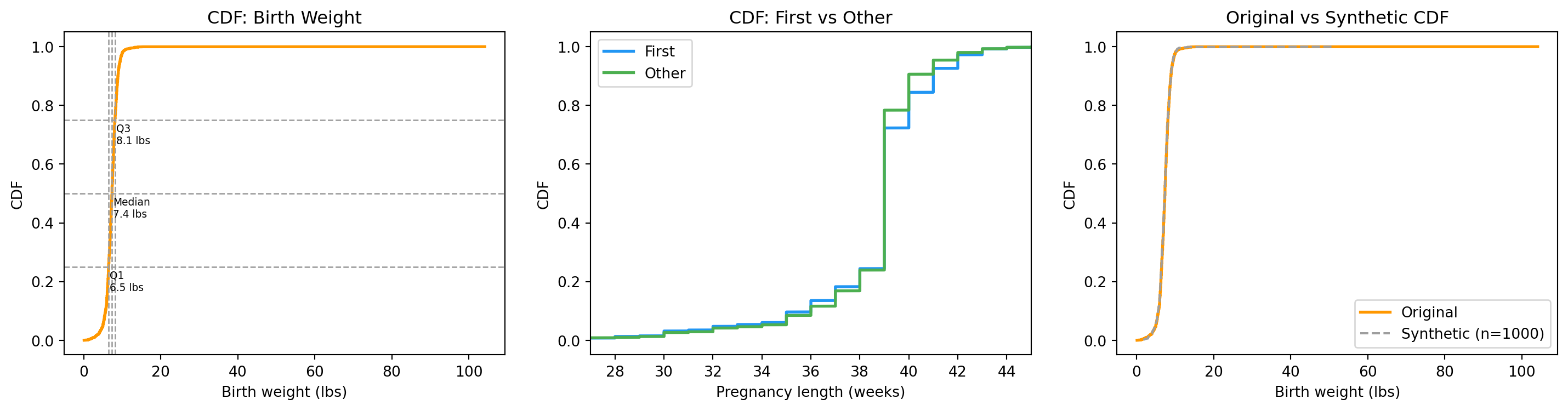
So the typical newborn weighs between roughly 6.4 and 8.1 lbs.
18.5 Comparing CDFs
The real power of the CDF: two CDFs on the same plot tell the whole story. For pregnancy length, plot first vs other on one axis. If the curves are nearly identical, the difference between groups is tiny.
print("── Where Does a Specific Weight Rank? ───────────────────")for w in [6.0, 7.0, 7.5, 8.0, 9.0, 10.0]:print(f" A baby weighing {w:.1f} lbs is at the "f"{wgt_cdf_all.percentile_rank(w):.1f}th percentile")
── Where Does a Specific Weight Rank? ───────────────────
  A baby weighing 6.0 lbs is at the 14.4th percentile
  A baby weighing 7.0 lbs is at the 40.0th percentile
  A baby weighing 7.5 lbs is at the 57.5th percentile
  A baby weighing 8.0 lbs is at the 72.9th percentile
  A baby weighing 9.0 lbs is at the 92.0th percentile
  A baby weighing 10.0 lbs is at the 97.9th percentile
18.6 Generating data from a CDF
A useful trick: if U is a uniform random number between 0 and 1, then F^{-1}(U) has the same distribution as the original data. This lets us simulate new data that matches an observed distribution — the foundation of bootstrap (Chapter 8).
np.random.seed(42)synthetic = wgt_cdf_all.sample(1000)synthetic_cdf = Cdf(synthetic)print(f"Original median : {wgt_cdf_all.median():.3f} lbs")print(f"Synthetic median : {synthetic_cdf.median():.3f} lbs")
Original  median : 7.375 lbs
Synthetic median : 7.375 lbs
18.7 Percentile-based statistics
The median is more robust than the mean: one outlier doesn’t shift it much. For skewed data, the median is usually a better summary.
Statistic
Formula
Sensitive to outliers?
Mean
\bar{x} = \frac{1}{n}\sum x_i
Yes
Median
value at 50th percentile
No
IQR
Q3 − Q1
No
Std dev
\sqrt{\frac{1}{n}\sum(x_i - \bar{x})^2}
Yes
18.8 Visualising it
fig, axes = plt.subplots(1, 3, figsize=(15, 4))# 1. CDF with quartile annotationsax = axes[0]ax.plot(wgt_cdf_all.xs, wgt_cdf_all.ps, color="#FF9800", linewidth=2)for p, label in [(0.25, "Q1"), (0.5, "Median"), (0.75, "Q3")]: x = wgt_cdf_all.value(p) ax.axvline(x, color=COLORS["neutral"], linestyle="--", linewidth=1) ax.axhline(p, color=COLORS["neutral"], linestyle="--", linewidth=1) ax.annotate(f"{label}\n{x:.1f} lbs", xy=(x, p), xytext=(x +0.3, p -0.08), fontsize=7)ax.set_xlabel("Birth weight (lbs)")ax.set_ylabel("CDF")ax.set_title("CDF: Birth Weight")# 2. Group comparisonax = axes[1]ax.plot(prg_cdf_first.xs, prg_cdf_first.ps, color=COLORS["first"], linewidth=2, label="First")ax.plot(prg_cdf_other.xs, prg_cdf_other.ps, color=COLORS["other"], linewidth=2, label="Other")ax.set_xlabel("Pregnancy length (weeks)")ax.set_ylabel("CDF")ax.set_title("CDF: First vs Other")ax.legend()ax.set_xlim(27, 45)# 3. Synthetic vs originalax = axes[2]ax.plot(wgt_cdf_all.xs, wgt_cdf_all.ps, color="#FF9800", linewidth=2, label="Original")ax.plot(synthetic_cdf.xs, synthetic_cdf.ps, color=COLORS["neutral"], linewidth=1.5, linestyle="--", label="Synthetic (n=1000)")ax.set_xlabel("Birth weight (lbs)")ax.set_ylabel("CDF")ax.set_title("Original vs Synthetic CDF")ax.legend()plt.tight_layout()plt.show()
Birth weight CDF with quartiles, pregnancy-length CDFs by group, and synthetic data from the empirical CDF.
18.9 Exercises
Build a CDF for birth weight. What is the median? What is the IQR?
Plot CDFs for first vs other babies. What do you notice?
Write percentile_rank(cdf, value) returning the percentile of a given value.
Write percentile(cdf, p) returning the value at a given percentile.
Use the inverse CDF to generate 500 synthetic birth weights. Plot them vs the original CDF.
18.10 Glossary
CDF — F(x) = P(X \leq x); fraction of data at or below x.
percentile — value below which a given percentage of observations fall.
median — 50th percentile; robust to outliers.
quartile — 25th, 50th, or 75th percentile.
IQR — Q3 − Q1; spread of the middle 50% of the data.
inverse CDF — given p, returns x such that F(x) = p.
robust statistic — not strongly affected by outliers.