So far we’ve worked with discrete distributions (PMF) and empirical CDFs. But many real variables are conceptually continuous — birth weight, height, income.
For a continuous variable, the probability of any exact value is zero:
P(X = 7.4321\ldots) \;=\; 0
Instead, we ask: what is the probability of falling in a small interval?
P(a \leq X \leq b) \;=\; \int_a^b f(x)\, dx
Here f(x) is the probability density function (PDF). It is not a probability — it is a density. A value of f(x) = 2.5 means “probability per unit length at x is 2.5”.
20.2 From histogram to PDF
A histogram is an approximation of the PDF — but it depends on bin width.
The kernel density estimate (KDE) is a smooth histogram that doesn’t require you to choose bins. Instead, it places a smooth “kernel” (usually Gaussian) at each data point and sums them:
  Variable                        Mean     Std     Skew     Kurt
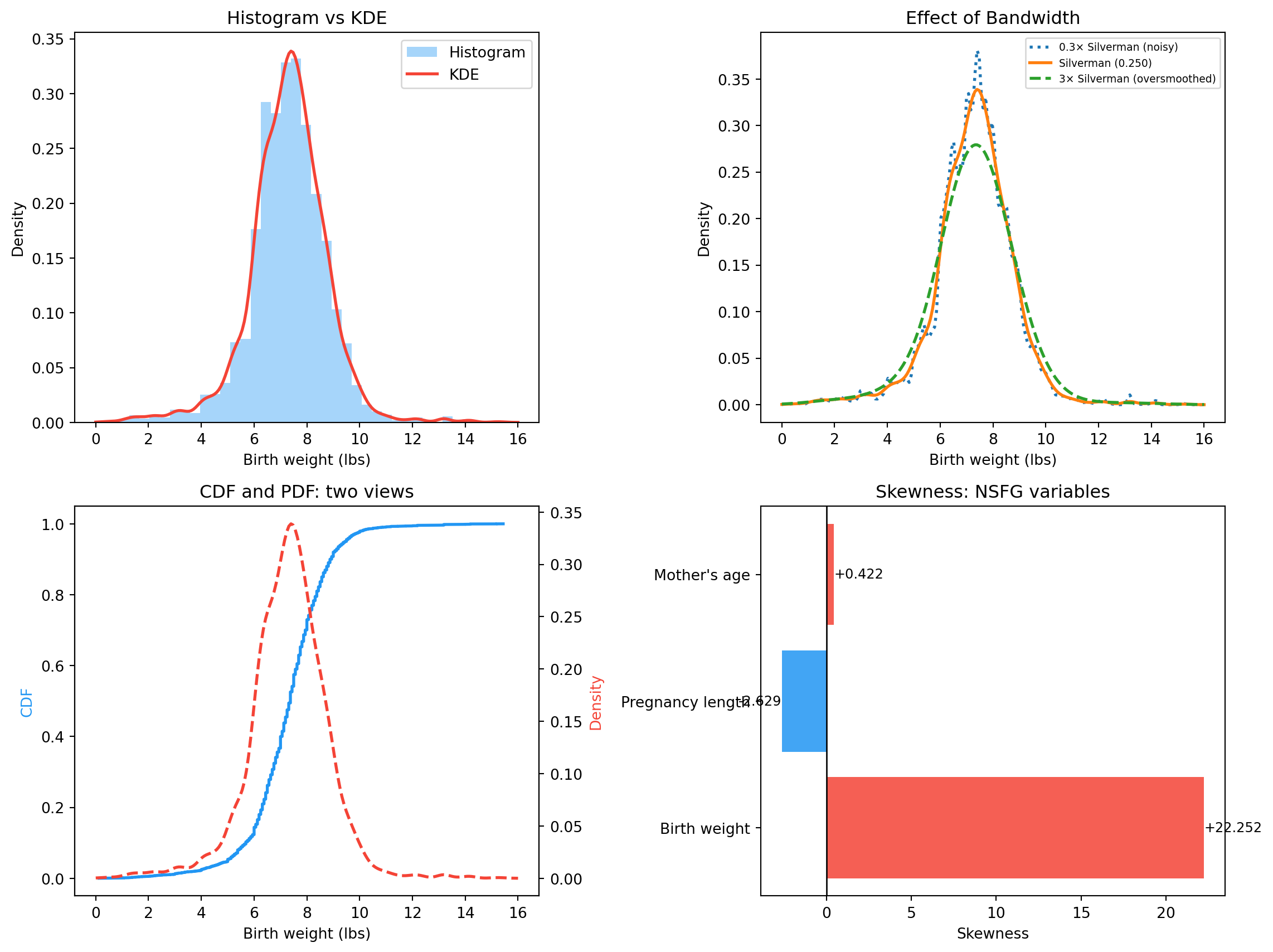
  Birth weight (lbs)              7.32    2.10  +22.252  +1000.010
  Pregnancy length (weeks)       38.56    2.67   -2.629  +13.998
  Mother's age (years)           24.94    5.57   +0.422   -0.465
Birth weight: slight negative skew (premature babies pull the left tail down). Pregnancy length: negative (you can be very premature, but rarely very post-term). Mother’s age: slight positive skew (most mothers in their 20s, tail into the 40s).
20.6 Visualising it
fig, axes = plt.subplots(2, 2, figsize=(12, 9))# 1. Histogram + KDEax = axes[0, 0]ax.hist(weights, bins=40, density=True, alpha=0.4, color=COLORS["first"], label="Histogram")ax.plot(x_eval, kde_vals, color=COLORS["highlight"], linewidth=2, label="KDE")ax.set_xlabel("Birth weight (lbs)")ax.set_ylabel("Density")ax.set_title("Histogram vs KDE")ax.legend()# 2. Bandwidth effectax = axes[0, 1]for h_factor, style, label in [(0.3, ":", "0.3× Silverman (noisy)"), (1.0, "-", f"Silverman ({h_silverman:.3f})"), (3.0, "--", "3× Silverman (oversmoothed)")]: h = h_silverman * h_factor kd = scipy_kde(weights, bw_method=h / weights.std()) ax.plot(x_eval, kd(x_eval), linestyle=style, linewidth=2, label=label)ax.set_xlabel("Birth weight (lbs)")ax.set_ylabel("Density")ax.set_title("Effect of Bandwidth")ax.legend(fontsize=7)# 3. CDF and PDF, two views of the same distributionax = axes[1, 0]wgt_cdf = Cdf(weights)ax2 = ax.twinx()ax.plot(wgt_cdf.xs, wgt_cdf.ps, color=COLORS["first"], linewidth=2, label="CDF")ax2.plot(x_eval, kde_vals, color=COLORS["highlight"], linewidth=2, linestyle="--", label="PDF (KDE)")ax.set_xlabel("Birth weight (lbs)")ax.set_ylabel("CDF", color=COLORS["first"])ax2.set_ylabel("Density", color=COLORS["highlight"])ax.set_title("CDF and PDF: two views")# 4. Skewness across variablesax = axes[1, 1]skew_vals, names = [], []for name, data in variables.items(): data = data[(data >0) &~np.isnan(data)] skew_vals.append(skewness(data)) names.append(name.split("(")[0].strip())colors_skew = [COLORS["highlight"] if s >0else COLORS["first"] for s in skew_vals]bars = ax.barh(names, skew_vals, color=colors_skew, alpha=0.85)ax.axvline(0, color="black", linewidth=1)ax.set_xlabel("Skewness")ax.set_title("Skewness: NSFG variables")for bar, val inzip(bars, skew_vals): ax.text(val +0.01if val >=0else val -0.01, bar.get_y() + bar.get_height() /2,f"{val:+.3f}", va="center", ha="left"if val >=0else"right", fontsize=9)plt.tight_layout()plt.show()
Histogram + KDE, bandwidth comparison, CDF/PDF on the same axes, and skewness across NSFG variables.
20.7 Exercises
Plot a KDE for birth weight at three bandwidths. How does the shape change?
Compute skewness for birth weight, pregnancy length, and mother’s age.
Which NSFG variable has the most positive skewness? The most negative?
Plot the CDF and its derivative (approximate PDF) for birth weight on the same figure.
Implement a Gaussian KDE from scratch using the kernel formula above.
20.8 Glossary
PDF — f(x) such that P(a \leq X \leq b) = \int_a^b f(x)\,dx.
density — value of f(x); not a probability.
KDE — smooth empirical PDF estimated from data.
bandwidth — smoothing parameter in KDE; controls noise vs smoothness.
Silverman’s rule — default bandwidth h = 1.06 \hat\sigma
n^{-1/5}.
moment — E[X^k].
skewness — third standardised moment; measures asymmetry.